Interview Notes
Study Design
Research Goal
Understand knowledge management and consumption patterns among graduate students — how they capture, organize, retrieve, synthesize, and share information — to surface pain points and design opportunities.
Interview Method
Semi-structured contextual inquiry (~30–60 min each). Transcription via Granola. First interview was impromptu; subsequent interviews used a structured question set refined with ChatGPT from the first transcript.
Topic Areas Covered
- Role and projects
- Data generation, capture, and organization
- Mental model: data vs information vs knowledge
- Project workflow
- Repository organization
- Collaboration
- LLM use cases
- Where current system breaks
- Desired workflow
- Ideas about the “ideal” process
Question Structure (34 questions across 11 sections)
| # | Section | Goal |
|---|---|---|
| 0 | Warm-up & Context | Establish role, domain, complexity |
| 1 | Primary Data Capture & Analysis | How raw data enters and becomes usable |
| 2 | Secondary Research & Literature | How external knowledge enters and is tracked |
| 3 | Note-Taking & Sensemaking | How meaning is extracted and stored |
| 4 | Synthesis & “Thinking Work” | How disparate materials come together |
| 5 | Retrieval & Breakdown Moments | Pain points around recall and interruption |
| 6 | In-Context Retrieval & Flow | Interruption costs |
| 7 | Ideal Retrieval & Organization Models | Desired affordances |
| 8 | Cross-Tool & Non-Work Knowledge | Boundaries of “important knowledge” |
| 9 | AI, Automation & Trust | Attitudes, not adoption |
| 10 | Privacy, Control & Ownership | Constraints for future systems |
| 11 | Wrap-Up Reflection | Participant frames the problem in their own words |
Participants Overview
| ID | Program | Year | Department | University | Date |
|---|---|---|---|---|---|
| P1 | PhD | 1st | Physics (Condensed Matter Experiment) | UW | Jan 27 |
| P2 | MS | 2nd (graduating Jun 2026) | HCDE (Product Management focus) | UW | Feb 1 |
| P3 | MS | Final (graduating Jun 2026) | Computer Science (ML/Algorithms) | UW | Feb 3 |
| P4 | PhD | 4th | Civil and Environmental Engineering | UW | Feb 3 |
| P5 | PhD | 4th | Earth Sciences (Seismology/Remote Sensing) | UW | Feb 4 |
P1 — Physics PhD Student
Profile: First-year condensed matter experiment physics PhD. Studies electronic transport measurements (Ohm’s law, Hall effect) with strain applied to materials. Works with one PI (Principal Investigator). Still in required coursework.
Data & Tools
| Aspect | Detail |
|---|---|
| Primary data | Voltages, currents, resistances, magnetic fields — automated instruments → CSV files |
| Analysis tool | Jupyter Notebook (Python) |
| Visualization output | Plots in notebooks → exported to Google Slides for group meetings |
| Literature mgmt | Zotero (on lab computer) + Google Spreadsheet (shared by senior lab member, organized by topic with paper titles/links) |
| Notes tool | Google Docs — one doc organized by topics, another with a running list of questions for PI/labmates |
| Classwork notes | Paper → scanned at end of quarter → local folder on laptop |
| Writing tool | LaTeX via Overleaf |
| Calendar/planning | Physical planner + Apple Calendar |
| File organization | Desktop folders by academic quarter; lab data on lab computers; shared items on Google Drive |
| Cloud storage | Google Drive (minimal use) |
Workflow
- Instruments generate CSV data → saved to lab computer in folders organized by date
- Files labeled by sample type + measurement type
- Open in Jupyter Notebook → create plots
- Export key figures to Google Slides
- Meet with PI → discuss plots → PI takes paper notes with diagrams
- P1 keeps physical paper notes in a folder at the lab (does not digitize them)
- PI directs next experiment → cycle repeats
Synthesis Process
- Guided by an overarching research question identified from literature gaps
- Progress = “Have I answered the question I set out to answer?”
- End goal: published peer-reviewed paper
- Currently contributing to a senior lab member’s paper
Pain Points
Retrieval is the core problem, not organization:
“I would say retrieval. Like, I know generally where something is, but then when there’s 30-some things in the folder and I’m looking for one, then it’s hard to pinpoint exactly which one.”
Search requires precise keywords:
“It requires you to remember precisely the keywords that are relevant and specific ones. Like, if you remember something too broad, then it’s going to bring up 30 things.”
Concrete retrieval failure: Tried to find a paper he vaguely remembered reading — remembered the topic but not the conclusion or specific terms. Couldn’t relocate it effectively.
Paper notes never digitized: Physical meeting notes from PI meetings accumulate in a folder — “maybe is going to get out of hand at some point.”
Ideal Retrieval
- Date-range filtering: “If I could give it a range of the dates where I last read it” + generic keywords
- Contextual keywords surfaced: Results should show additional specific keywords per article to trigger recognition — “maybe more specific keywords that then trigger, like, memory”
- Context-aware search: “Maybe the search somehow understands the context that I’m in. Like, say, ‘Oh, we’re currently looking at this paper. You’re probably looking for something related.’”
- Sorted by date read
- Post-retrieval: Would ideally make a note connecting two related articles with links
AI Attitudes
- Does not use LLMs. Rare AI use overall.
- Used Google Gemini once to identify a printer model/manual via photo.
- Hesitations: (1) Not more useful than Google search for his needs. (2) Moral concerns about environmental impact (water usage, impact on vulnerable communities).
- Open to AI for organization/synthesis — “it seems to be good at taking large volumes of information and making sense of it”
- Not for scientific writing — “it doesn’t know what it’s talking about once you get to be too technical”
Privacy & Automation Concerns
- Primary concern: Too much personal data accessed; distrust of data stewards
- If local/self-owned: Acceptable — “theoretically, if it did, sounds good”
Content Consumption
- YouTube (educational videos, chess — used to have instructional playlists)
- Digital books (doesn’t bookmark for leisure reading)
- Instagram (sends to friends, doesn’t save)
- Classical music, piano, chess
- Does not take screenshots
P2 — HCDE Masters Student (PM Focus)
Profile: Second-year master’s student at UW HCDE, graduating June 2026. Focused on Product Management. Heavy information consumer across many channels. Working on a capstone project with a UW research center.
Data & Tools
| Aspect | Detail |
|---|---|
| Primary output | Text-based assignments/documents (not quantitative) |
| Capture tools | Chrome bookmarks (categorized folders: career, school, design inspiration) + Notion (database for UX/HCI/AI/PM topics — links, pasted content, highlights) |
| YouTube | Saves to playlists (career, workout, travel) or likes videos |
| Temporary/not meaningful — technically information but not knowledge | |
| Meeting notes | Granola (backup, rarely revisited) |
| Collaboration | Figma/FigJam for verbal discussion capture |
| Hand notes | Bullet points or visual mind maps when learning deeply |
| Note translation | Sometimes paper → Notion, or photo of drawing uploaded |
Information Categorization (by channel)
- YouTube: Cooking, neuroscience, emotional state-related content
- Newsletters/articles: Career-focused — recently AI tools, coding efficiency
- Instagram: Temporary, not meaningful knowledge
Capstone Workflow
- Working with UW research center on understanding research processes and grant securing
- Sponsor shared previous materials: user journey maps, Figma files, training videos, documents
- Three teammates — verbally share learnings to align understanding and challenge interpretations
- Still defining project scope
- Meetings captured in Granola; ideas shared via Figma/FigJam
Pain Points
Revisiting saved content is a major pain point:
“Honestly, not much. I should. I wanted to organize everything as a New Year’s resolution, but I haven’t yet. Revisiting is a pain point.”
Knowledge application gap: Knowledge only becomes meaningful when absorbed and applied. Actionable content (recipes, workouts) is easy; conceptual content (AI articles expanding perspective) is hard to apply.
“I wish something could create action items or track what I’ve learned to help me apply it.”
Retrieval frustration — split across locations:
“It’s frustrating when I remember writing notes but don’t know whether they’re in Notion or my notebook.”
Fallback: Search Google again. If not significant, abandon it.
Tool fragility — Obsidian abandoned: - Markdown was intimidating - Tagging was inconsistent (“career” vs “career development” became separate tags) - Got messy → abandoned, copied everything back to Notion
Also tried and abandoned Walling (grid-based, better for images than long text).
Current fragility: Two similar Notion databases (UX/HCI and archive) — sometimes doesn’t know where to save.
Ideal Retrieval
- Automatic linking like Obsidian’s neural map — “Instead of manually remembering connections, it reminds me”
- Results as map or threaded interface showing how new information connects to previous saved content — whether it expands or contradicts it
- Summary at top when searching within saved content
- Search cues used today: Topics, keywords, key concepts, source name (e.g., “Lenny” + keywords)
AI Tools Used
Granola (meetings), ChatGPT, Gemini, Claude, Claude Code, Antigravity. - ChatGPT holds most personal/professional context - Claude for side projects (especially Claude Code)
Privacy & Automation Concerns
- Not privacy — doesn’t see knowledge as too personal
- Echo chambers are the concern: “Like social media algorithms, it might bias me toward what I already like. Ideally, it would introduce diverse viewpoints.”
Context Switching
- Searching distracts: “Searching exposes unexpected information. I start reading irrelevant things, which leads to procrastination.”
- Ideal: Pop-up/side panel (like Gemini) so she can search without fully leaving current task
One Fix
“Put everything into one unified database — at least within Notion.”
P3 — MS Computer Science Student
Profile: Final-year MS CS student at UW, graduating June 2026. Goal: master’s degree for tech industry jobs. Focused on ML and algorithms. Also works part-time at a hospital.
Data & Tools
| Aspect | Detail |
|---|---|
| Projects | 3-4 concurrent (one per class); currently a literature review + coding projects |
| Primary storage | Google Drive (Excel sheets + Google Docs). Coding: local desktop + GitHub |
| Bookmarks | Chrome folders (bookmarks bar) — CS, schoolwork, interview prep — somewhat out of date |
| Planning | Google Sheets (color-coded progress, priorities, time estimates) + Google Calendar + Trello boards |
| Notes | iPad Notes app (sketches/drawings), Google Docs, Microsoft Notepad (lightweight but scattered), Sticky Notes |
| Previous tools tried | Notion (used briefly for a colleague’s project), Obsidian (liked simplicity of markdown, stopped because “hardcore Google Drive person”) |
| Writing | Google Docs, Microsoft Word |
| AI tools | ChatGPT (for harder assignment questions, prompt engineering) |
| Work tools | Crystal Practice Management (hospital-specific software) |
Literature Review Workflow
- Professor provides guidelines
- Create search queries → search IEEE, ACM, Google Scholar
- Refine queries to narrow paper list
- Read papers with partner → determine overall message
- Rough notes in Google Doc → highlight key insights/contributions
- Draft essay-style paragraphs
- Weeks-long process: drafts → feedback sessions with professor → iterate
Capture Behavior
- Finds paper → copies link + writes a couple notes on contribution
- Realized during interview he should use an Excel spreadsheet with columns for paper contributions
- Uses ChatGPT when stuck on a hard paper
Pain Points
Scattered notes across too many tools:
“Time. I have to remember where I wrote things. The other week I used Microsoft Notepad to take notes from a meeting with my professor, and I completely lost that note sheet.”
Cost of retrieval failure:
“I lose what was discussed with my professor, or I have to think again about how I got to that information. It’s time.”
Fallback: Talk to professor again, re-derive the solution. Doesn’t fix the system — just uses Notepad/Google Drive again.
Revisiting friction — forgotten structure:
“Sometimes my files or Excel sheets are structured in a way where I can’t remember why I set it up that way — why columns are written or labeled a certain way. It takes five or ten minutes to remember. Sometimes I’d rather not work on it anymore.”
Storage fragmentation: Running out of storage on primary Google account (10+ years). Switched to second account — now must remember which drive has which docs.
Bookmarks/Instagram saves: Disorganized, rarely revisited.
Resistance to new tools: Self-described as “rigid” — considers it a weakness but finds switching from Google Drive to other platforms hard.
Synthesis Process
- Needs to see how pieces fit together “like a puzzle”
- Would create a map/network to see connections
- Sketches on iPad Notes app or types things out
- Software friction: Word/Docs annoying to reorder items; iPad app unfamiliar for copy/pasting drawings
Ideal Retrieval
- Keywords in title (2-3) that help recognition, plus 10-15 sub-keywords in caption/description
- Not knowing where it is is more frustrating than not knowing how to query
- Connections: Writes them down manually — notes concepts in Excel, recognizes connections in head, writes in Google Doc
- Cross-device access: Desktop widget + mobile app connected to same database — “I don’t want to rely on my desktop all the time”
- Results sorted by: Location, creation date, last modified date
- Post-retrieval: Synthesize, connect pieces, iteratively combine until complete
AI Attitudes
- Uses ChatGPT for assignments (harder questions, time-constrained)
- Good at prompt engineering (2-3 attempts)
- Hesitation: Prefers to learn information himself
- Sees AI helping everywhere but concerned about reliance reducing learning
- Concerned about hallucinations and un-traceable synthesized material
Privacy & Automation Concerns
- Privacy is #1 — personal info in drive, doesn’t want tools accessing it
- Correctness is #2 — doesn’t trust without understanding the software
- Even if local with internet connection: still a privacy issue
- If only linking (no generation): More comfortable — connecting by date, query terms, relevance without generating new material
Context Switching
- Focus deviates from deep synthesis thinking → shifts to search mode → must track what was left off
- Ideal: Side panel / sticky note overlay that persists while Chrome is in background
One Fix
“Maybe use a one-stop shop tool — like OneNote.”
P4 — PhD Civil & Environmental Engineering
Profile: Fourth-year PhD at UW Civil and Environmental Engineering. Research: using ML and data science on large geospatial satellite data to understand surface water movement (rivers, lakes, freshwater). Created “Headlight” reservoir monitoring tool.
Data & Tools
| Aspect | Detail |
|---|---|
| Data types | Geospatial raster (3D/4D arrays: lat, lon, time, variables) and vector (shapefiles). Climate data from NASA/other labs. Large public/open datasets (land cover, etc.) |
| Analysis | Python (xarray, statistical analysis, ML). VS Code with plugins (CSV viewer, NetCDF viewer, syntax/error checking) |
| Visualization | QGIS and ArcGIS (local, need UI). Plots/maps via Python |
| Storage | Lab server machines (~32 TB). Data stored there; connect via VS Code remotely |
| Notes | Notion (primary), Jupyter notebooks, Word, sometimes physical notebook |
| Writing | Microsoft Word |
| Figures | PowerPoint (for assembly, fine prep — symbols, legends). Figures also as PNG/JPG in OneDrive folders |
| Version control | GitHub (code). Word/PowerPoint via OneDrive version history |
| Literature | Google Scholar → reads via URL (rarely downloads). No reference manager (tried Mendeley/Zotero — bad experience with plugins, formatting) |
| Citations | Manual in Word document — author name inline, references list at end |
| Collaboration | Shared Word files (everyone has access). GitHub for code. PowerPoint for presenting to stakeholders |
| Organization | OneDrive (school) for ~8 directories by project. Google Drive (personal) |
| Communication | Slack |
Workflow
- Identify research gap from literature (read 15-20 papers)
- Collect data from cloud/URLs → save to lab servers
- Explore data statistically in Python
- Work on hypothesis/experiment → statistical checks
- Discuss results with collaborators → verify → run more experiments
- Filter key figures into PowerPoint for meetings
- Write paper in Word: problem → data → methodology → results → conclusion
- Publication cycle: 5-6+ months per project
Artifacts Per Project
- 10-15 figures
- 1 Word document
- 2-3 PowerPoint presentations
- 4-5 code files
- Jupyter notebooks (source of truth for thinking)
Pain Points
Storage space conflicts:
“We constantly delete data after processing so we can download/process more. There are multiple users on the same servers, so we get memory-space conflicts.”
Python environment fragility: Packages upgrade/downgrade and code breaks.
Time gap between literature review and writing:
“The failure is the gap between literature review time and writing time. That gap can be 4-5 months, 10 months, even a year. The larger the gap, the harder it is to remember.”
Ethical citation pressure:
“It becomes hard to cite work we used to base our research. If we don’t cite, it’s ethically wrong.”
Vague keyword search failure: Vaguely remembers something from a paper but can only search with vague keywords on Google Scholar. Sometimes finds it, sometimes doesn’t.
Concrete retrieval example: Working on Headlight tool — saw unexpected inverse correlation in a figure. Tried to remember if there was a calculation mistake. Tool was written 2 years ago — went back to source code, looked fine, couldn’t remember what caused the result.
Intention-uncertainty at capture time:
“I tried saving links in Notion, but it’s hard to know what exactly I’ll need to cite later. When reading, I’m not sure whether I’ll use that information in the final document.”
Word document version control in collaboration:
“With many papers/iterations, it’s difficult to manage versions when collaborating. Multiple people edit at the same time.”
Synthesis Process
- PowerPoint as a filter: not source of truth (code is), but filters most important figures for non-technical stakeholders
- Research paper is ultimate source of truth (includes story + methodology)
- Progress: collect → analyze → verify → filter to PowerPoint → write paper
- Intermediate steps live in PowerPoint slides holding plots
Ideal Retrieval
- AI-assisted Q&A on papers: “Ideally I ask AI with the paper, or an AI that has all research papers: it gives the answer and points to the paper so I can cite it”
- Example queries: “X% of reservoirs are losing storage at an alarming rate” (remembers claim, not exact number). “North America is seeing more extreme snowstorms” (wants supporting paper without reading it fully)
- Results presented as: Q&A format — papers have 2-3 research questions, wants to jump to that question and see findings. Multiple options/answers (conflicting is fine).
- Recognizability signal: Citation count — 1000 citations vs 5, prefers higher
- Use case: Wants to ask these questions while writing the document
- Temporal retrieval: “What did I read last week?” → show date, time spent reading, highlights. Ability to pinpoint/crop parts of text directly
AI Attitudes
- Tried ChatGPT for literature review — unreliable: “It creates citations for papers that don’t exist, URLs that don’t exist”
- Sees potential for AI to answer questions about papers if traceable to sources
- Can’t fully trust AI but would be ideal if reliable
Privacy & Automation Concerns
- Data sharing, safety, security — wants to know how data is used, reveals behavior
- If local: Acceptable “as long as it’s not used to train a model — like a recommendation model”
One Fix
“Maybe a GitHub-like version [control] for documents — but documents are heavier.”
P5 — PhD Earth Sciences / Seismology
Profile: Fourth-year PhD at UW. Research: machine learning detection of landslides via satellite imagery and seismic/infrasound data. Created an ML detection model. Recently published a paper on model development; now working on location stage.
Data & Tools
| Aspect | Detail |
|---|---|
| Data types | Sentinel satellite imagery (2D geospatial, vector + raster, 3-30m resolution, 3-10 day frequency). Seismic data (1D time series). Infrasound data (3-component time series) |
| ML tools | PyTorch, scikit-learn, AWS |
| Data sources | Planet satellite data, IRIS/EarthScope (seismic sensors) |
| Storage | Local computer + lab servers (VPN access). GitHub for code sharing |
| IDE | Jupyter notebooks (primary thinking artifact + collaboration vehicle) |
| Collaboration | GitHub repo with advisor. Google Slides for presentations (2-3x/week). Slack for notes/discussions |
| Presentation | Google Slides — one running deck per project, keeps adding slides over time |
| Feedback capture | Speaker notes in Google Slides + Slack conversations |
| Literature | Google Scholar → reads online → sometimes saves link + PDF in Google Sheet on Google Drive |
| Writing | Overleaf (LaTeX) |
| Organization | Project directories with subfolders: notebooks, source, figures, data, deployment |
| Personal | Google Maps (places), Facebook/Instagram reels (dance tutorials — revisits 1-2x/week before dance socials) |
Workflow
- ML model detects landslides on seismic data
- Validate: keep only detections at 5+ stations simultaneously
- Locate detected landslide
- Gather satellite data → check if landslide visible in imagery (validation)
- If passes → save to catalog
- Currently experimental, not yet deployed continuously
- Send results to advisor → discuss → investigate unexpected results → iterate
- In background: write research paper iteratively (do → results → advisor feedback → improve → repeat)
- Compile final products from each stage into paper → iterate with advisor until coherent
Artifacts
- One running Google Slides deck per project (grows over time, 2-3 presentations/week added)
- Jupyter notebooks (clearly titled, primary thinking artifact)
- Logbooks (code output logs per station/time period)
- Plots, catalogs, figures
Pain Points
Does not take meeting notes (admits he should):
“I should, but I don’t.”
Forgets intermediate process details:
“I usually forget intermediate process details — like what models I tested before selecting the best one, or which hyperparameters I tried. That stuff doesn’t make it into the final paper but is still important.”
Poor documentation of notebooks: Has to go through many notebooks to find specific details; not well documented.
Fallback when can’t find: Repeats the process — recreates notebook/code to reproduce the result.
Needs README files:
“I think I need a README file noting all the processes I did. If I revisit code after two years, I don’t know what I did.”
Infrastructure fragility: VPN connection (insecure coffee shop WiFi blocks it). GPU memory limits when multiple users share resources.
Retrieval Strategy
- Opens Google Slides → goes through slides sequentially
- If not in slides → checks project directory → Jupyter notebooks (titled clearly)
- Remembers final outcomes per stage, forgets intermediate details
Ideal Retrieval
- Retrieval by date — “go to the slide for a particular date and find that information — with links and figures”
- Search dimensions: Specific dates, headings/subheadings, Jupyter notebook structure, questions
- Results: Well-labeled output figures with Jupyter notebook link + proper caption. List format, sorted by date.
- Post-retrieval: Saves into slide deck (creates a slide with figure + notes/links)
AI Attitudes
- Consumes tutorials for unfamiliar tools — codes along directly rather than taking notes
- No explicit mention of heavy AI use for research
Privacy & Automation Concerns
- Accuracy is the primary concern: “It should remember correctly — everything I did”
One Fix
“Make it more systematic.” Disrupted by random tasks from advisor (involved in many projects).
Cross-Cutting Themes
Theme 1: Retrieval Over Organization
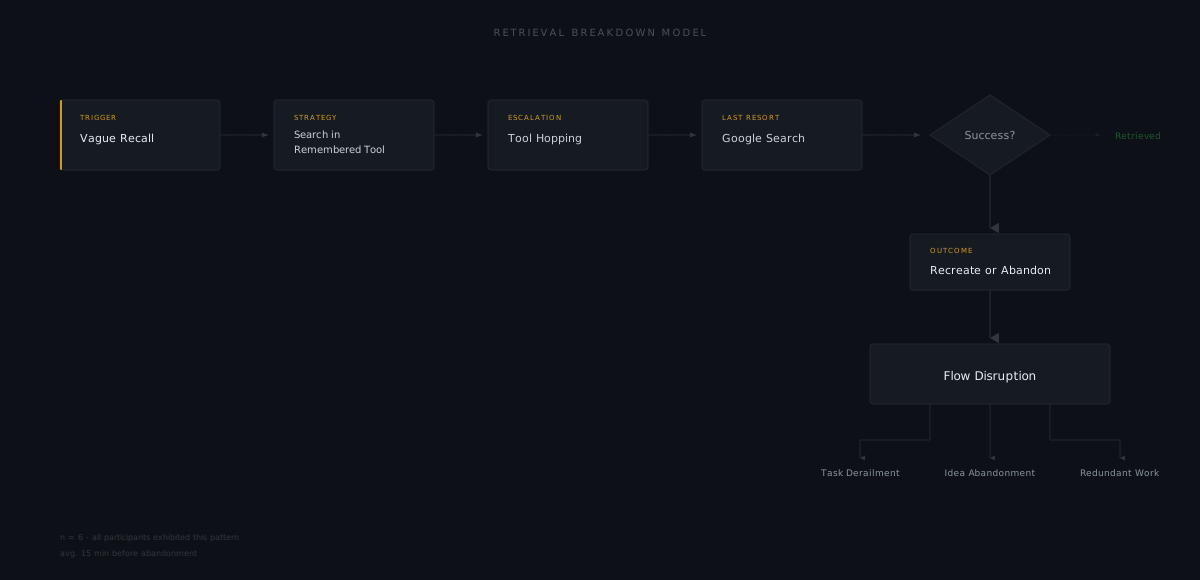
All participants can roughly locate information (right folder, right tool) but struggle to pinpoint the specific item. The problem is retrieval precision, not storage structure.
| Participant | Quote |
|---|---|
| P1 | “I know generally where something is, but then when there’s 30-some things in the folder…” |
| P2 | “It’s frustrating when I remember writing notes but don’t know whether they’re in Notion or my notebook” |
| P3 | “Mostly not knowing where it is” |
| P4 | “Frustrating to find the paper with only vague keywords” |
| P5 | “Sometimes I have to go through many notebooks to find specific details” |
Theme 2: Keyword Search Fails for Vague Recall
Participants remember concepts, ideas, or approximate timeframes — not precise terms. Current search (Ctrl+F, Google Scholar, folder browsing) requires exact keywords.
Desired alternatives: Date ranges, context-aware search, concept/question-based queries, automatic keyword surfacing for recognition.
Theme 3: Context Switching Costs
Searching interrupts deep work. All participants described losing focus when switching to “search mode.”
| Participant | Mitigation Idea |
|---|---|
| P2 | Pop-up/side panel (like Gemini) |
| P3 | Sticky note overlay on screen while Chrome is in background |
| P4 | Wants to ask questions while writing the document |
| P5 | Slides as retrieval anchor — always available |
Theme 4: Knowledge Scattered Across Tools
Every participant uses 4-8+ tools/locations. No single system of record.
| Participant | Tools/Locations |
|---|---|
| P1 | Zotero, Google Sheets, Google Docs, Google Slides, Jupyter, paper notes, local folders |
| P2 | Notion (2 databases), Chrome bookmarks, YouTube playlists, Figma/FigJam, Granola, hand notes |
| P3 | Google Drive (3 accounts), Excel, Google Docs, Chrome bookmarks, iPad Notes, Notepad, Sticky Notes, Obsidian (abandoned), GitHub |
| P4 | Notion, Jupyter notebooks, Word, PowerPoint, OneDrive, Google Drive, lab servers, Google Scholar (reads via URL) |
| P5 | Google Slides, Jupyter notebooks, GitHub, Slack, Google Sheet, Google Drive, local project directories |
Theme 5: Capture-to-Synthesis Gap
Large time gaps between when information is consumed and when it’s needed for synthesis/writing. This causes citation loss, idea loss, and re-work.
| Participant | Gap |
|---|---|
| P1 | Paper notes from PI meetings never digitized |
| P4 | 4-5 months to a year between literature review and writing |
| P5 | Intermediate experiment details (hyperparameters, rejected models) not documented |
Theme 6: AI Trust Spectrum
| Participant | Stance | Key Concern |
|---|---|---|
| P1 | Avoids AI | Environmental/moral concerns + not useful enough |
| P2 | Heavy AI user | Echo chambers (not privacy) |
| P3 | Selective user | Hallucinations; prefers learning himself |
| P4 | Tried & distrusted | Fabricated citations/URLs |
| P5 | Minimal mention | Accuracy |
Theme 7: Privacy Concerns for Automated Systems
| Participant | Concern | If Local? |
|---|---|---|
| P1 | Personal data access; distrust of stewards | Acceptable |
| P2 | Not privacy — echo chambers | N/A |
| P3 | Privacy #1; correctness #2 | Still concerned (internet connection) |
| P4 | Data sharing/safety/security; behavioral profiling | OK if not used to train models |
| P5 | Accuracy | N/A (primary concern is correctness) |
Theme 8: Tool Abandonment Patterns
| Participant | Tool Abandoned | Reason |
|---|---|---|
| P2 | Obsidian | Markdown intimidating; tagging inconsistency |
| P2 | Walling | Grid-based, bad for long text |
| P3 | Notion | Already had other tools; didn’t stick |
| P3 | Obsidian | Clunky compared to Google Drive familiarity |
| P4 | Mendeley/Zotero | Plugin didn’t find all papers; formatting chaos |
Theme 9: “One Fix” Wishes
| Participant | Wish |
|---|---|
| P1 | More effective search (date + generic keywords + context awareness) |
| P2 | Unified database within Notion |
| P3 | One-stop shop tool (like OneNote) |
| P4 | GitHub-like version control for documents |
| P5 | More systematic process; README documentation |